Sigma HUD Technical Design, Room Generation Algorithm and Gameplay Designs
A downloadable asset pack
<Property of Dirk Allen, all rights reserved>
Overview
Sigma was a smaller project initiated after Chrono project to work as a new project for me to learn the gamedev ropes with intended much smaller scope than its predecessor.
The game is intended to be a 2D roguelike endless arena survival, where player had to beat as many randomly generated rooms as possible.
With setting and story Sigma was supposed to work at the same time as a prequel to Chrono, experiencing the perspective of our antagonist, with action taking place in a special training simulation of the planet.
Below you can find some technical designs for HUD, an algorithm for room generation as well as designs for some mechanics and rules for the game created by me and most were created first by designing them on paper then recreated with proper proportions using Inkscape.
HUD Designs
Status Bar
Status Bar was a base HUD element set on top left (or top right for Second Player/Rival, rotated horizontally) corner of the screen to display Player (or Rival) vital information, such as:
- Character Avatar sprite image;
- Character Experience progress bar (orange border around avatar);
- Health progress bar (red bar at the top);
- Aether (Mana equivalent) progress bar (blue bar in the middle);
- Stamina progress bar (yellow bar at the bottom).
Under the character status bar, two separate weapon information bars are set, displaying three pieces of information:
- Weapon sprite image;
- Weapon category experience progress bar.
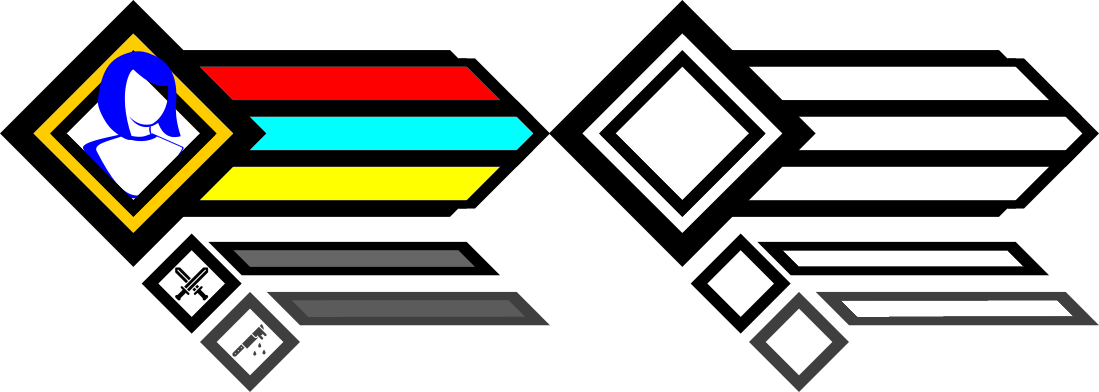
Left: Visual representation of intended use of the Status Bars
Right: Base frame export for Unreal Engine HUD Widget
The player can have a set of two weapons with them at the same time but can only use one weapon at once, allowing the player to swap between used weapon at will.
Top weapon bar displayed currently equipped weapon, while bottom one (slightly transparent) displayed the inactive weapon.
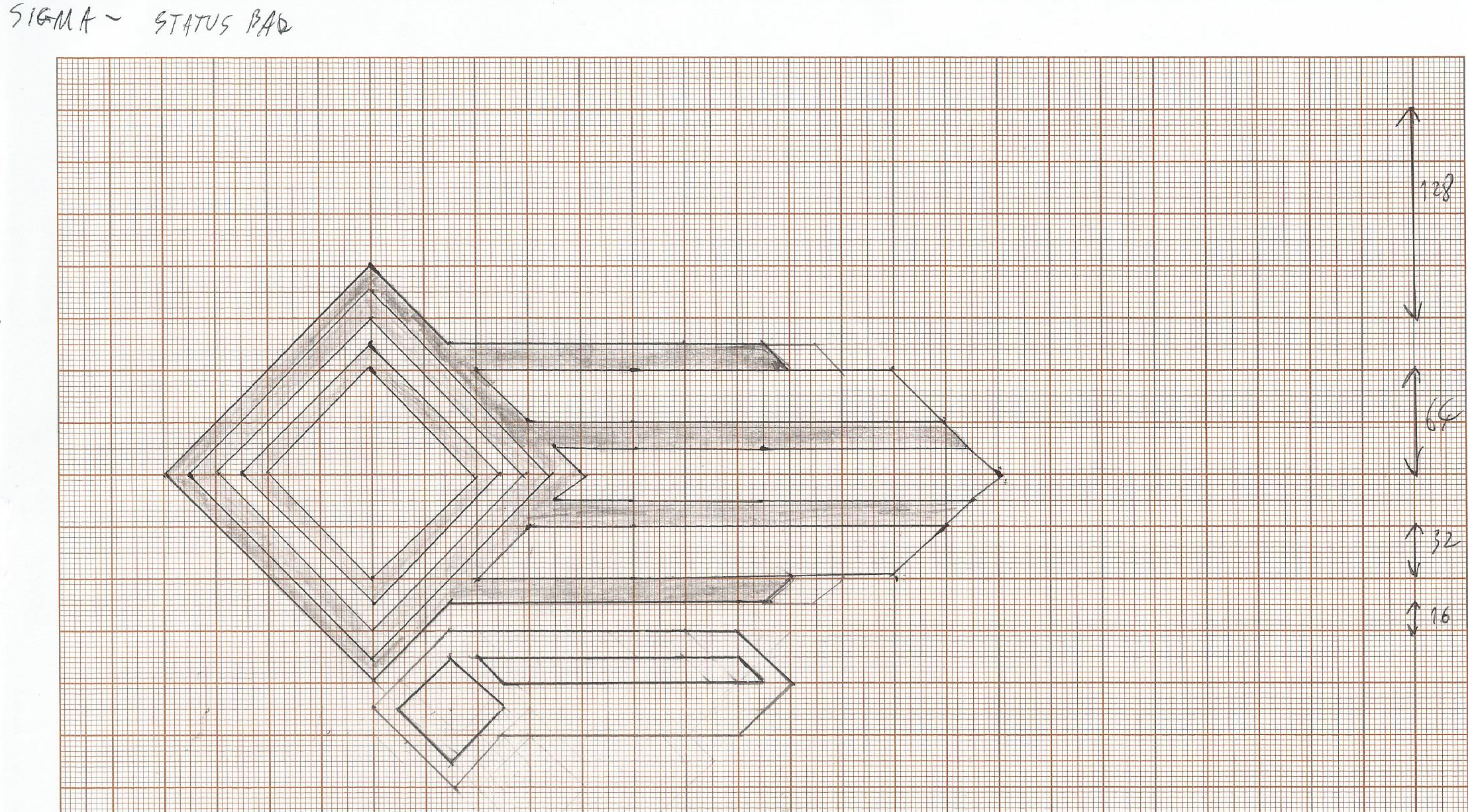
First sketch of the Status Bar
The design was intended as a base for the status bar, depicting it's shape working as a guideline for graphical designer, allowing for potential style variety to match different characters personality in the HUD as well as to give customizable options for the player as a potential unlockable rewards to incentivize to play more.
Skill Wheel
Set at bottom left/right corner of the screen, the Skill Wheel is second most important element of the HUD, displaying player's available skills as well as it displayed their availability information and input key to activate them.
Pixel measurements were included here as a way to show size and distance proportions between elements of the skill wheel but those can be easily changed to match needs as well with proper implementation in the engine those values could be easily adjusted by the designer inside the engine for instant results.
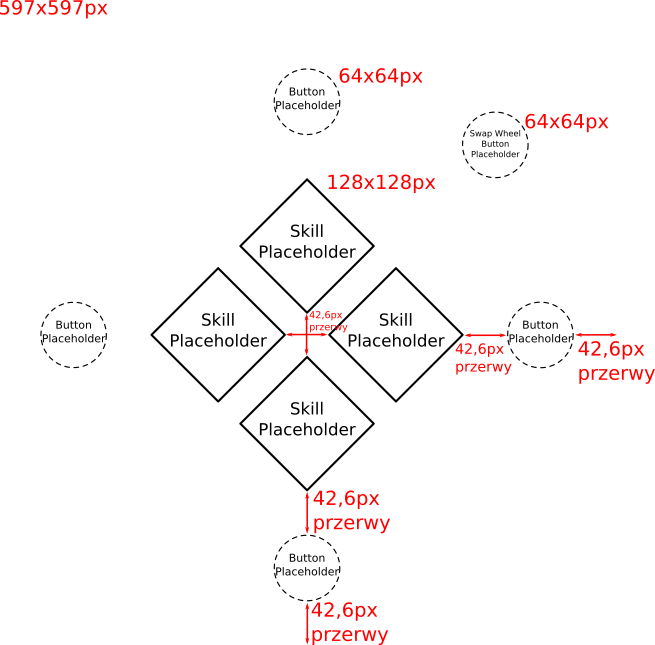
('gap' is translated to 'przerwy' in polish language)
SKILL WHEEL ELEMENT BREAKDOWN
| ELEMENT NAME | DESCRIPTION |
|---|---|
| Skill Placeholder | Romb border containing sprite image of the assigned skill |
| Button Placeholder | Image displaying input key for the matching skill used to activate it |
| Swap Wheel Button Placeholder | Image displaying input key used to swap between a set of two skill wheels |
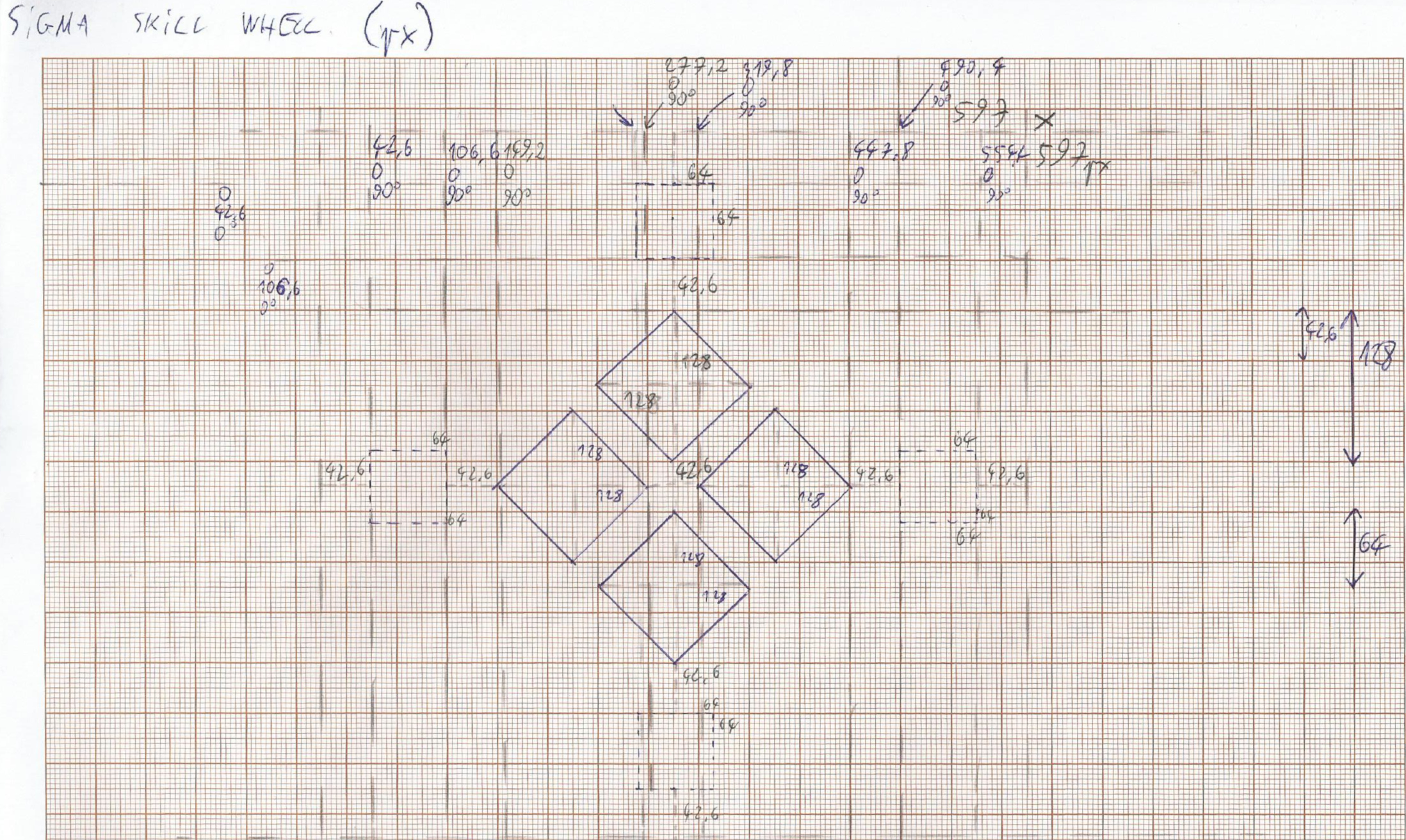
First sketch of the Skill Wheel
At start of each run, player innately has two basic skills, Basic Attack and Dash. As the run goes and player levels up their weapon handling, they can obtain new active and toggable skills that can be assigned to the skill wheel.
One skill wheel can contain 4 skills at once, with player having access to 2 Skill Wheels at once that can be used mid gameplay, allowing the player to use up to 8 skills during play.
Original intention for using the skills from the second Skill Wheel was by activating them with Overload by holding the input key visible on the Skill Wheel (Swap Wheel Button) allowing for fast and responsive skill usage instead of having to first swap the Wheel.
If a slot would not have any skill assigned that specific slot and their input key are hidden to avoid taking screen space.
Whenever a character on the screen would enter a "HUD Safe Zone" making the HUD element cover that character, that specific HUD element would become slightly transparent to avoid covering that character.
Skill Visualization on the Skill Wheel
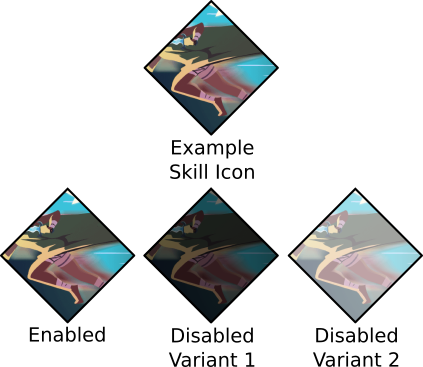
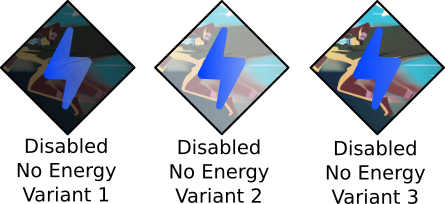
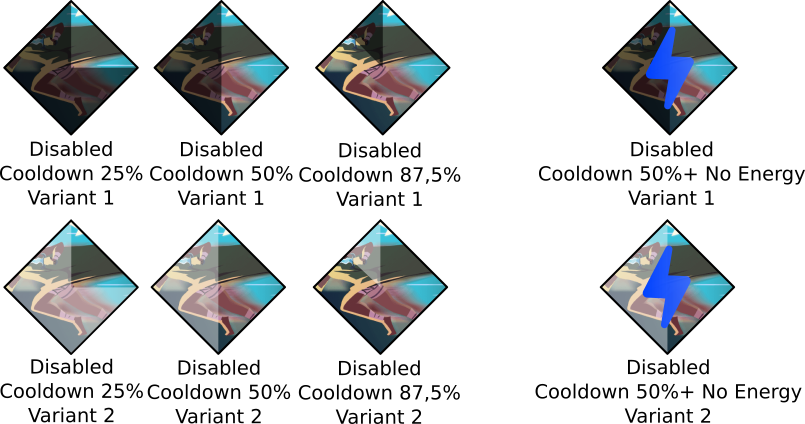
Below are some design concepts of visualizing various states of the skill inside the Skill Wheel during gameplay. (With Slay the Spire's Blur card art as a placeholder art for basic Dash skill)
Enabled and Disabled Skill
Disabled - Not enough Resource (Aether/Stamina)
Disabled - Skill on Cooldown
Combo Bar
Located under Status Bar in the HUD, Combo Bar displays information about current Combo, which is one of the important mechanics that rewards the player for good gameplay.
By defeating enemies (or dealing damage to Rivals), player builds up Combo (one combo level per defeated enemy) which is displayed by the Combo Bar in the HUD.
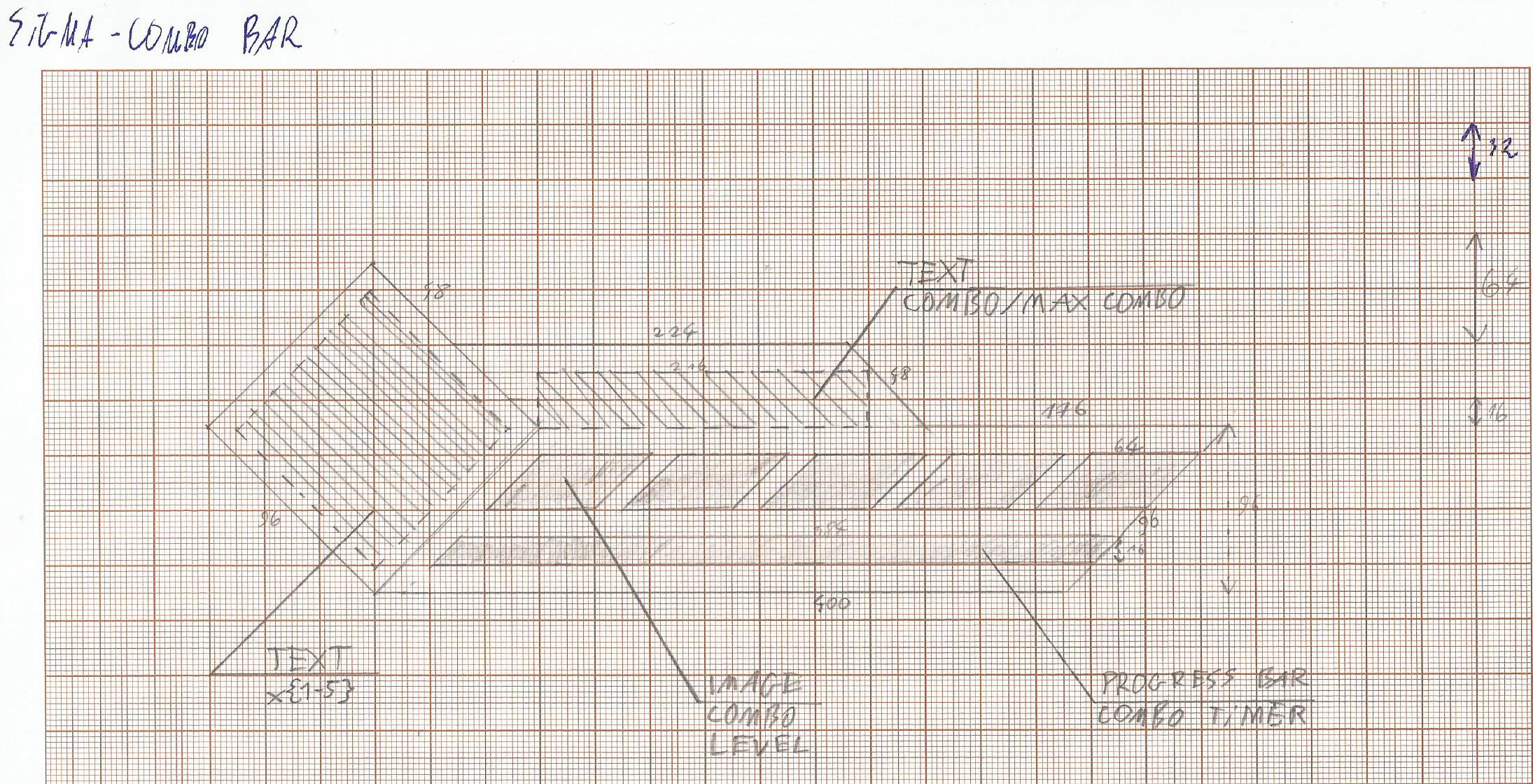
First sketch for the Combo Bar
With each level of combo, gained experience and point score from defeating enemies is increased, rewarding player for maintaining good playstyle.
However, combo is time-based and if player will take too long it can expire, which is displayed by timer at bottom progress bar.
Player can extend the duration by dealing damage, however the time gets considerably reduced whenever player takes damage.
Additional benefits of the combo that players can exploit are the Ultimate Skills.
Those are powerful moves bringing incredible power to the table, however it comes with a cost. As using ultimates require consuming whole combo when it's at max level, players are met with a choice of either maintaining the combo to progress faster or to use it for immidiate payoff.
Gameplay Designs
Room Generation Algorithm
Having Endless run structure in mind, I found typical room generation that can be found in room-based roguelikes not suitable for this project.
Having previously prepared rooms would be easy to implement but with endless run structure in mind, gameplay would become stale pretty fast, while completely random generation would be too chaotic and would often bring frustration in regards to player experience and balancing.
Having that in mind, I decided to go for a compromise and create an algorithm from scratch using both prepared room and chaotic generation elements.
For algorithm creation, I used diagram creation tool Draw.io.
As result, I came up with an algorithm based on Point Pool, comparable to typical army building with Wargame Miniature games.
For readability on site, the algorithm had been segmented with colors, single lines leading to another segmented part.
For full resolution image, click here:
[PNG]
[draw.io]
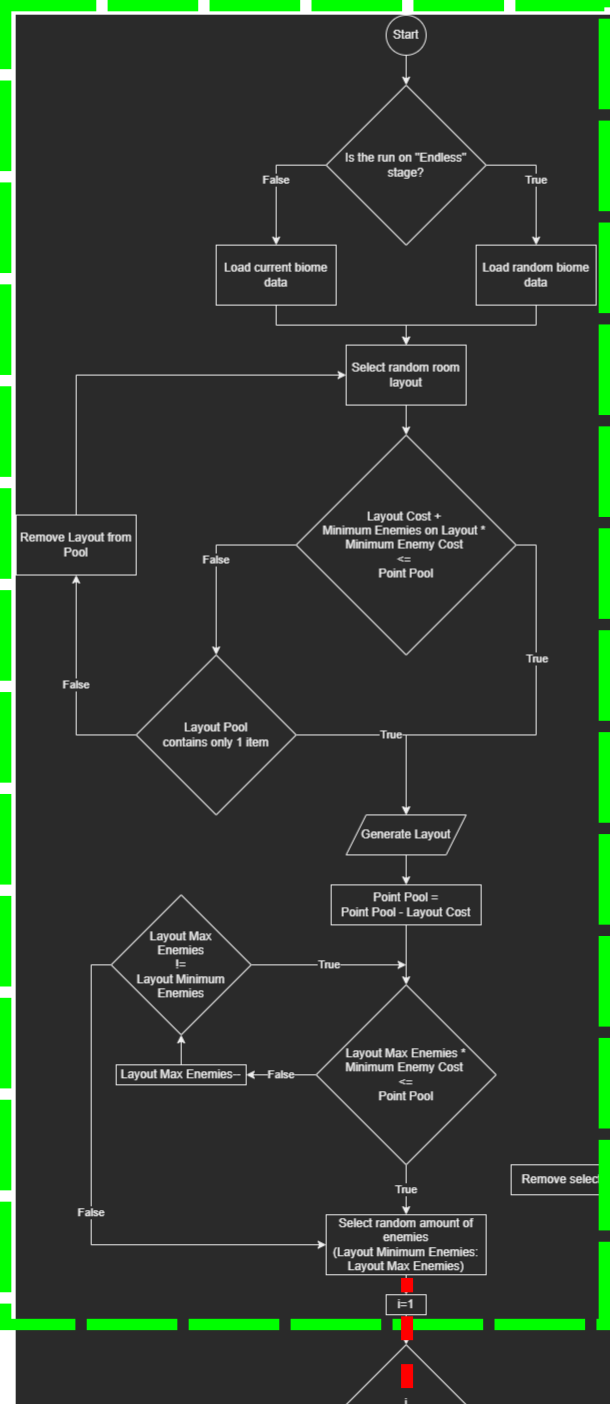
Part 1: Selecting collection of asset data based on the stage and selecting random room layout with predefined spawn points.
Using prepared layouts, enemies and traps, each having their own assigned Point Cost, algorithm first selects a layout looking for a combination where minimal amount of elements in cost wouldn't surpass the Point Pool, selecting random set of enemies and traps, assigning them to possible enemy or trap slots on selected layout until either current layout runs out of free slots for new elements or won't have enough remainining Points to generate new enemies and traps.
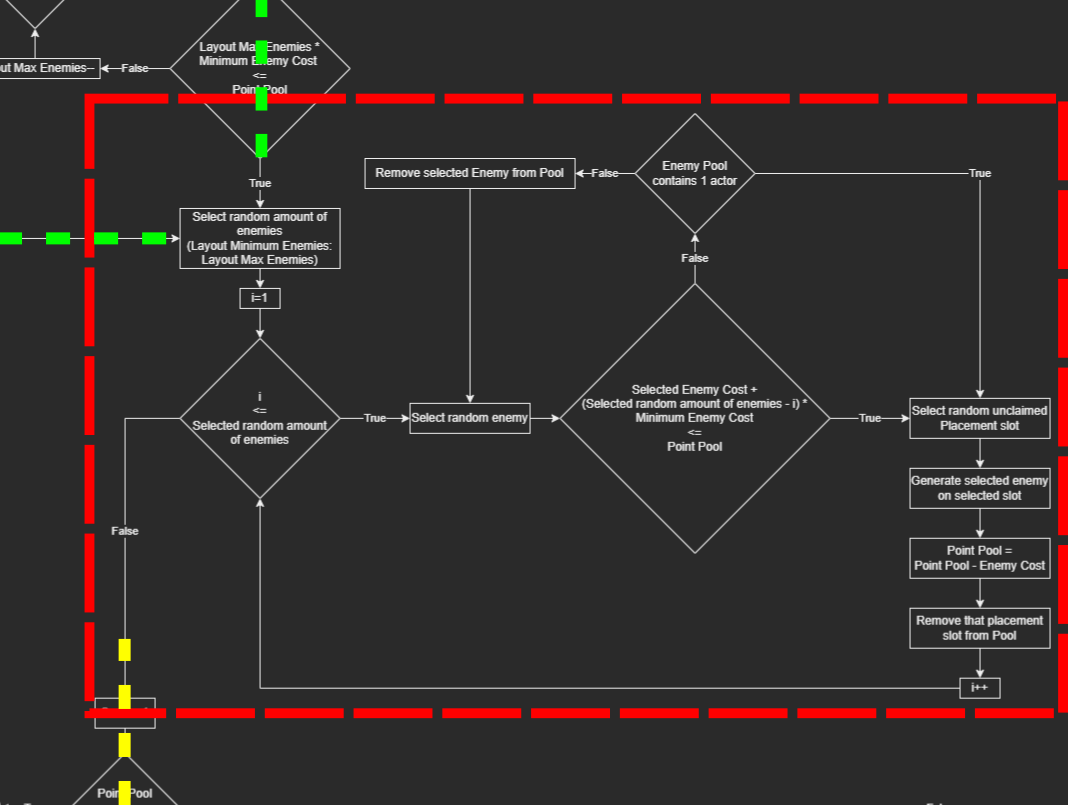
Part 2: Selecting random enemies and assigning them on available spawn points from selected Layout
With leftover points being distributed to increase the difficulity of the room, by assigning modificators to spawned elements and increasing level of the current enemies.
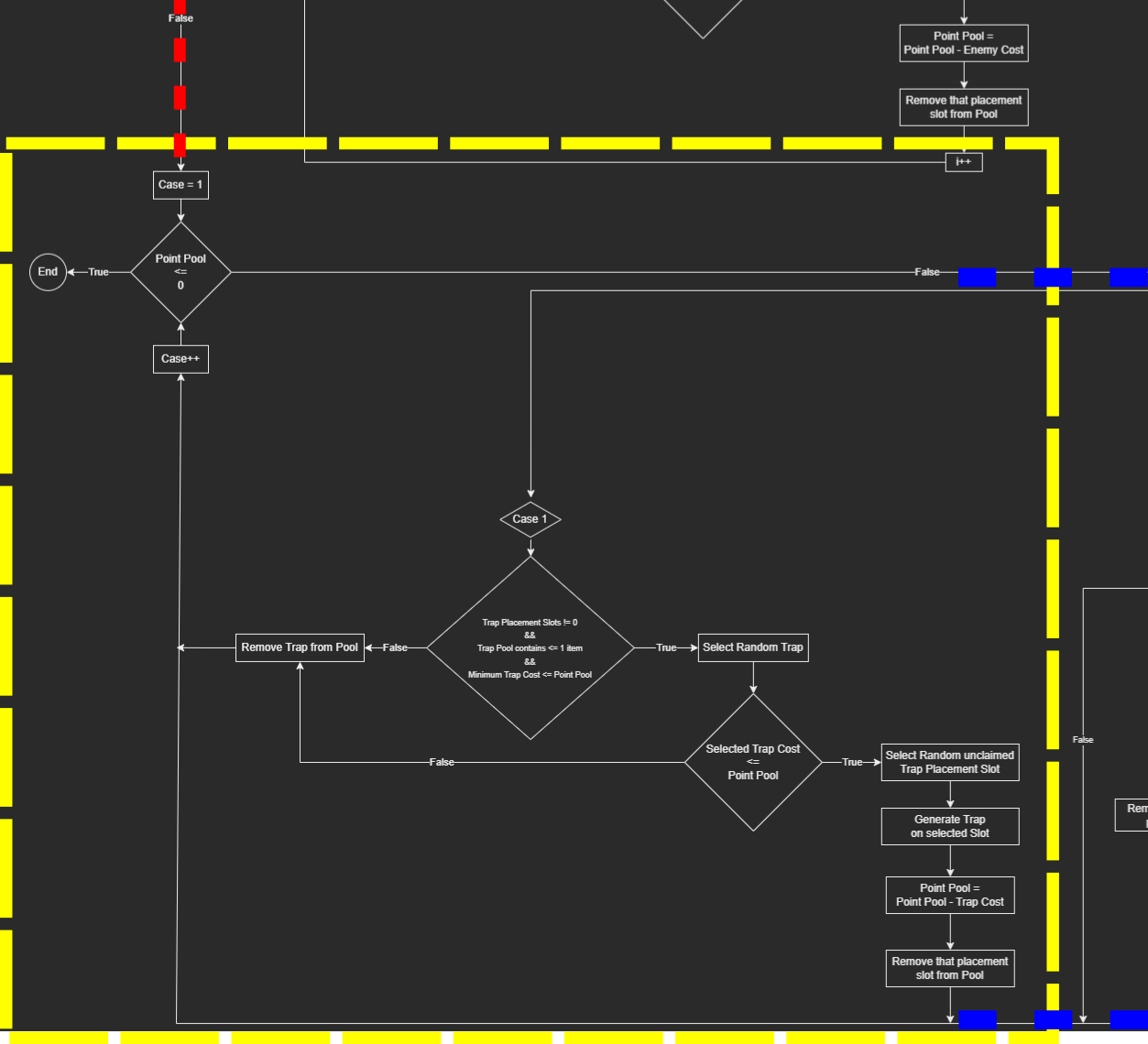
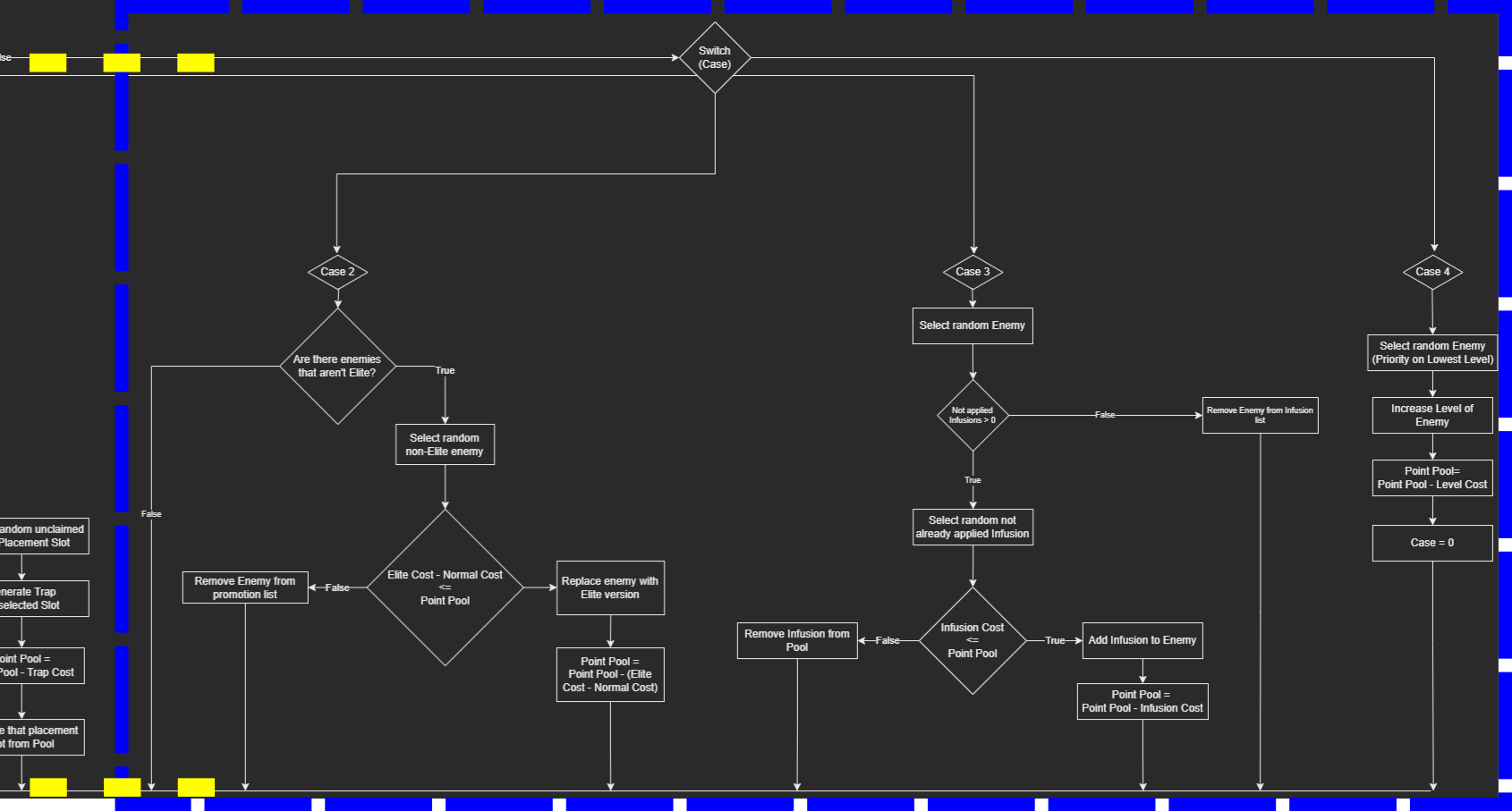
Part 3: Spending leftover Points to generate traps and increase difficulity until Point Pool will be empty.
Point Pool would slowly increase with each passed room and adjust itself looking at current player performance, which in theory should generate progressively harder rooms over time, while at the same time adjusting the pool to slow the difficulity progression if the player is having trouble and needs to catch up as well as make difficulity progression faster to bring challenge to players that are doing exceptionally well, to avoid making the experience stale.
Even though I made this algorithm from scratch, I am quite sure that some developers probably already made it work for their titles, even though I did not played personally (or remember any) games that would utilise a similar algorithm for room generation.
The algorithm itself, though originally prepared with 2D rooms bound by screen size in mind, can be very easily adjusted to work with other types of games as well as take a different approach at how it should calculate Point Cost for single elements and how to track Player Performance.
This algorithm is base of my "Dynamic scene generation algorithm adapting to game phase and player performance." bachelor's thesis in college.
Mid-Run Player Progression
During the run, player can gain experience by defeating enemies. To incentivize more variety during gameplay, there are two different types of leveling systems in game affecting the gameplay in different ways.
| TYPE | CHARACTER LEVEL | WEAPON TYPE LEVEL |
| INCREASED BY | Gaining experience from defeating enemies | Gaining experience from defeating enemies using specific Weapon Type |
| REWARDS FOR LEVEL | Gaining Stat Point to distribute to increase Character Stats | Gaining Skill Point for leveled Weapon Type Ability Tree |
| VARIETY | One per Player | One for each Weapon Type per Player |
| AFFECTS | Incraeses general character stats like: damage with specific weapon types, attack speed, skill damage, Stamina and Aether (mana) regeneration, Maximum Health, Maximum Stamina and Aether, Combo Time length and Rewards from Combo, Skill cooldowns etc. | Unlocks and upgrades passive, active and ultimate abilities from Weapon Type Ability Tree |
Even though Player can increase base damage for specific types of weapons by increasing according character stats that are linked to those, most of the damage will still come by the randomly generated weapons as rewards for completing rooms, increasing in power the further the player is during a run, incentivizing player to swap weapons often.
Another element that incentivizes player to swap weapons often during run are the Ability Trees uniqie for each Weapon Type.
Each contains it's own set of skills that can be unlocked by progressing Weapon Type Level and they affect the power of the player greatly.
| SKILL TYPE | PASSIVE | ACTIVE (+ ULTIMATE) |
| DESCRIPTION | Once unlocked, Passive skills are enabled and affect the player until end of the run. Does not require specific weapon type to be in possesion of the player to be enabled. | Once unlocked, they can be assigned to the Skill Wheel and can be activated during gameplay. Requires player to have weapon in possesion from assigned weapon type for that skill to be used. Possesed weapon does not need to be active weapon. |
While active skills incentivize using a specific playstyle for the player, passive skills are the one that in the end incentivize swapping weapons more often.
Having access to passive skills from different weapon types rewards the player for using weapons they don't really enjoy other than just weapon's generated firepower, while at the same time it allows for immense variety of possible builds for players that want to strategically build their character during the run, as well as bringing options to adapt to the randomness of the game.
As an optional quality of life feature, each combination of possesed by player weapon types have their own saved preset, allowing the player to save different combinations of skills on skill wheel and switching to that preset automatically whenever player changes weapon, removing the need to manually remove and assign new skills every time a new weapon is picked up.
Stress Mechanic
Designed as a special mechanic for a special Rival that acts as the final boss of the run (marking the run as Victorious if defeated even if player will continue playing for Endless mode and fall later) as well as for rare "Nightmare" rooms and potentially difficult run difficulity modificator,
Stress is an ultimate challenge testing both player control and gameplay mastery while at the same time working as a narrative mechanic for the protagonist of this project and her backstory.
Whenever stress is enabled, on receiving damage, partial % of that damage increases character stress as well, hindering the player in the process.
The more stress is accumulated, the stronger the handicap gets.
Those include:
- Reduced area visibility, including HUD;
- Reduced and even completely disabled audio effects from the environment (with exception of player character SFX), replaced by player character increased heavy breathing and heartbeat;
- Disabling random equipped skills when reaching certain stress thresholds until stress be under that threshold (with exception of Basic Attack and Dash skill).
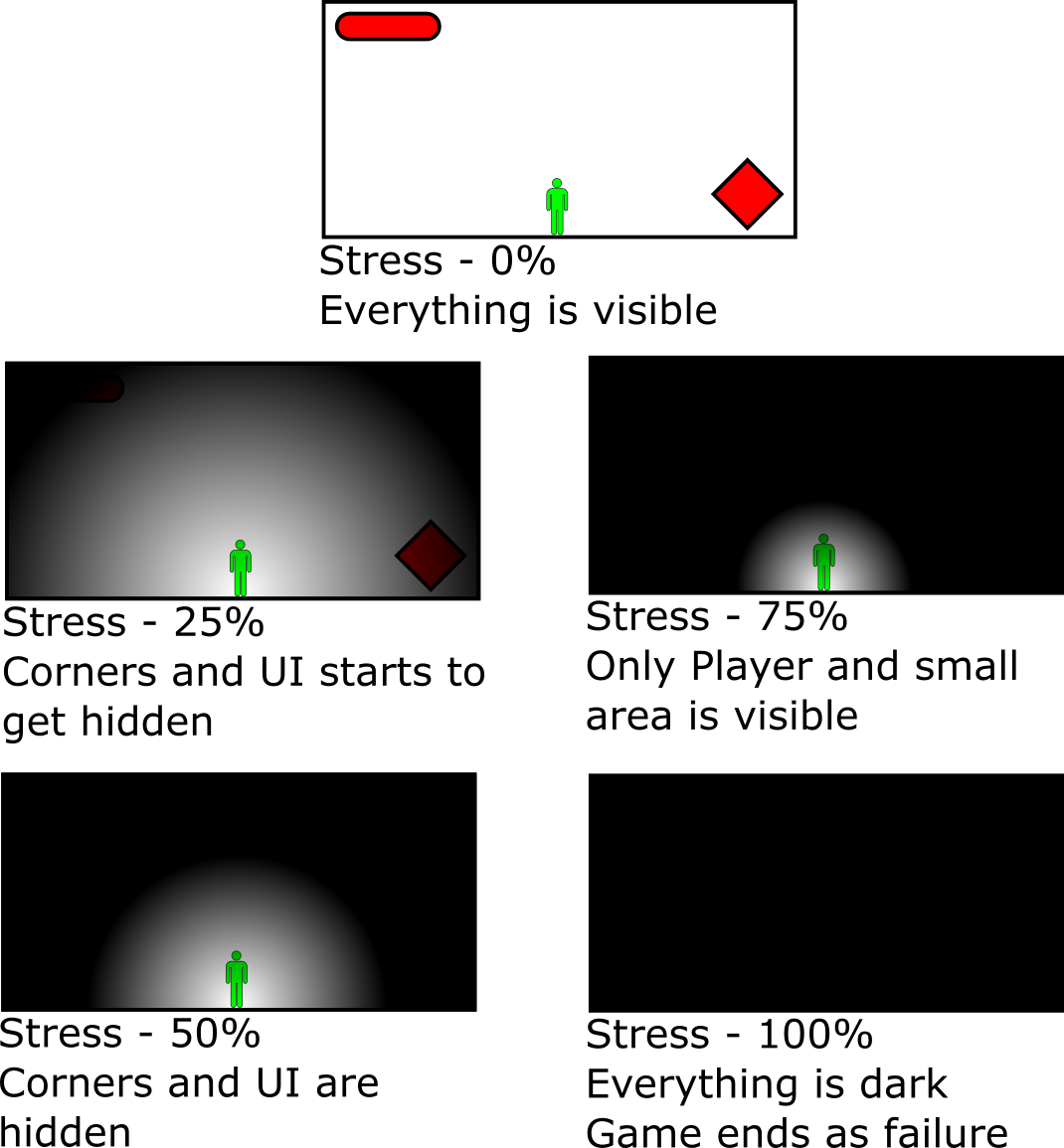
Example visualization of screen visibility reduction with stress increase with player located in the middle of the room
Managing stress is crucial, as not only it hinders the gameplay making it harder to fight and survive but also whenever stress reaches its maximum threshold, player character will become unconscious from panic attack, ending and marking the run as a loss.
Player can reduce their current stress by either not receiving any damage for some time or by succesfully dealing damage to enemies.
Due to the immense difficulty that this mechanic brings, it is not intended to be enabled in typical runs but rather be enabled only when fighting the final boss of the run, Rival codenamed as "Shadow Valkyrie" or during very rare "Nightmare" rooms with bigger intention to work as a narration element for the protagonist and her backstory rather than being a balanced gameplay mechanic, as the player is expected to fall to the stress at first attempts, to unfold the story further.
However it doesn't stop it from being available as optional difficulity option that would enable this mechanic for the duration of the whole run for experienced players that seek for an ultimate challenge.